The most common reason developers don't announce what they ship is friction: the feature is done, the PR is merged, and the last thing anyone wants is to open four social platforms and write four versions of the same post. So the announcement never happens, and the feature launches silently.
Cursor already sits where the work happens. It speaks MCP (Model Context Protocol), which means one small JSON config gives its agent the ability to post: draft the announcement from the actual diff or changelog, upload a screenshot, validate against each platform's rules, and schedule — without leaving the editor.
This guide covers the exact config, prompts that work, and the ship-then-announce workflow that makes it stick.
Nardi Braho - July 4, 2026
TL;DR: Add the stdio MCP block below to
.cursor/mcp.json(project) or~/.cursor/mcp.json(global) with a SocialClaw workspace API key. Test with "list my connected social accounts." Then: ship → "draft an announcement thread from this changelog, validate, schedule for 9am" → keep coding.
How do you add a social media MCP server to Cursor?
Step 1 — connect accounts once. Sign up at getsocialclaw.com, connect your social accounts via OAuth in the dashboard (X, LinkedIn, Instagram professional, Facebook Pages, TikTok, Discord, Telegram, YouTube, Reddit, WordPress, Pinterest), and copy your workspace API key.
Step 2 — add the MCP config. Cursor reads MCP servers from .cursor/mcp.json in your project (or ~/.cursor/mcp.json for all projects). Add:
{
  "mcpServers": {
    "socialclaw": {
      "command": "npx",
      "args": ["-y", "socialclaw", "mcp"],
      "env": { "SOCIALCLAW_API_KEY": "sc_live_your_key" }
    }
  }
}
This launches the MCP server from the socialclaw npm package over stdio — no separate install, no server to run. The key lives in the config's env, never in prompts. If you commit .cursor/mcp.json to a shared repo, reference the key from an environment variable instead of inlining it.
Step 3 — test. Open Cursor's agent chat and ask: "List my connected social accounts." If your accounts come back, the connection works.
Cursor's agent now has 17 tools across the publishing lifecycle: discovery (list_accounts, account_capabilities), media (upload_asset), validation (validate_schedule, preview_campaign), publishing (apply_schedule, publish_draft), and inspection (run_status, post_attempts, retry_post, get_analytics, and the rest). The same setup works in Claude Desktop with an identical JSON block — the full multi-client guide is how to post to social media with Claude.
What does the ship-then-announce workflow look like?
The point of doing this in Cursor specifically is context: the agent can read the code you just changed. The workflow that sticks:
- Merge the feature.
- Prompt from the same editor:
Read CHANGELOG.md for the latest release. Write a 3-tweet X thread
about the export feature (developer audience, no hashtags) and a
LinkedIn post in a more formal tone. Attach ./docs/export-demo.png
to the LinkedIn post. Validate both and show me previews before
scheduling for tomorrow 9am and 10am ET.- Review the previews in chat, approve, done. The agent uploads the screenshot with
upload_asset, validates each payload, applies the schedule, and can confirm delivery afterward withrun_status.
Other prompts that earn their keep:
- "Draft a Discord announcement and a Reddit post for r/ourproduct from this PR description. Discord can go out now; show me the Reddit draft first."
- "Check whether yesterday's posts published. Retry anything that failed."
- "What were our top posts this month by engagement?"
The habit that keeps it reliable: validate → apply → verify. Validation catches per-platform rule violations (character limits, media shapes, Instagram's professional-account requirement, TikTok's PNG rejection) before anything is live, and checking run_status catches the cases where a platform accepted a post and then failed it asynchronously. "Accepted" is not "published."
Can you automate this beyond the editor?
Yes — the editor flow and CI flow complement each other:
- Interactive (Cursor): judgment calls, launch posts, anything a human should phrase. You review previews in chat.
- Unattended (CI): mechanical announcements — release notes on every tag. The same workspace API key drives the
socialclawCLI and HTTP API from a workflow file, with validation still in the pipeline. Full walkthrough: post your changelog to social media from GitHub Actions.
A common split: Cursor for the launch thread that needs taste, GitHub Actions for the routine "v2.4.1 released" posts.
How much review should each platform get?
A per-platform ladder works better than a blanket rule. Discord and Telegram are low-stakes and conversational — let the agent post there without ceremony. Reddit deserves a human read because subreddit norms vary. X sits in the middle: previews are cheap, so review the thread but don't agonize. LinkedIn goes last and always gets an explicit approval, because a mis-toned post on a professional surface costs more than the minute of review saves.
| Surface | Stakes | Sane default |
|---|---|---|
| Discord, Telegram | Low — conversational | Agent posts autonomously |
| Medium — subreddit norms vary | Human reads the draft | |
| X | Medium — public but fast-moving | Review the preview, then apply |
| High — professional audience | Explicit approval, every time |
Encode whatever ladder you choose in your project rules (Cursor reads project-level instruction files the same way it reads mcp.json), so every session applies it without being reminded. The agent drafts everything; you only gate the surfaces where tone matters.
Why route it through a publishing layer instead of platform APIs directly?
Because eleven platforms means eleven OAuth apps, token refresh flows, media pipelines, and rule sets to maintain — a side project of its own. A hosted publishing layer holds the connected accounts once and normalizes the differences; the MCP server exposes it all as tools any agent can call. Cursor gets the same workspace as Claude Code, the CLI, and the dashboard, so nothing about your setup is editor-specific.
The trade-offs between MCP servers (hosted vs self-hosted, platform coverage, validation and delivery inspection) are ranked in the best social media MCP servers.
FAQs
Can Cursor post to social media?
Not by itself — Cursor has no social accounts. With a publishing MCP server configured in mcp.json, its agent can draft, validate, schedule, and publish to connected accounts through tool calls, and verify delivery afterward.
Where does Cursor's MCP config file live?
.cursor/mcp.json in the project root for per-project servers, or ~/.cursor/mcp.json for global ones. The mcpServers JSON shape shown above is the same one Claude Desktop uses.
Does the SocialClaw MCP server need a separate install?
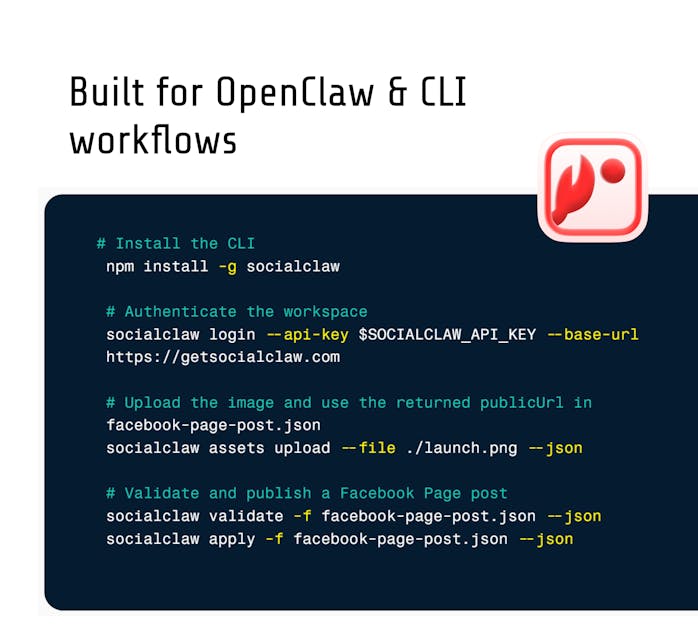
No. The config launches it with npx -y socialclaw mcp, which pulls the npm package on demand. The same package is also the CLI (socialclaw login --api-key <key>), so anything you do interactively can later be scripted.
Can Cursor post a screenshot or video?
Yes. Point the agent at a file in your repo; it uploads via upload_asset and gets a hosted media URL reusable across posts. Note the platform rules: TikTok photo posts are JPEG/WebP only (PNG fails with file_format_check_failed — SocialClaw auto-converts hosted media), and Instagram requires a professional account.
Should the agent publish without review?
For low-stakes surfaces like Discord or Telegram, auto-posting is fine. For X and LinkedIn, have it validate and show previews, then apply after your approval — one extra message, much lower blast radius.
Does this work with editors other than Cursor?
Yes — the same stdio block works in any MCP-capable client, and Claude Code can use SocialClaw's hosted HTTP endpoint with a one-line claude mcp add. Start from the Claude setup guide if you use multiple clients.